Saturday, 20 May 2017

Song#2 All on this Farm - Composing and Arranging Stage

And so here's the next part. Minor update, GF loves the song #1 Missing Piece :)
  1. Idea Stage
  2. Composing and Arranging Stage
  3. Recording Stage
  4. Mastering Stage aka apply-some-magic-time
  5. Final Product
In case you are new here, here's the intro blog.

Setting up

Using the Loopmaster Bluegrass pack loaded up in Kontakt, I hooked it up (I used Kontakt 5 16 out for more channels) in the MIDI channel called Acoustic Guitar.


Then, I wired each stereo channel pair to each instrument. For example, Acoustic Guitar takes channel 1/2 and Banjo takes channel 3/4


all up until I used up all the 16 channels. Then I made sure that the channels were routing correctly out of Kontakt...Acoustic Guitar> st. 1 and Banjo st.2


Which then routes to a External  Instrument (under Instruments) per MIDI Instrument (i.e. Banjo) with the following settings

Arranging

The loops come with a standard set of intro, verse, chorus and outro based on the parent key (which can be modulated on the fly). I chose the Bb set due to its recommended faster tempo of 125 bpm.

The next part is assembling the sound effects and sculpting the final music to fit the genre. Repetition is going to bore the listeners, so every time the listeners encounter the same line, I added something different to the mix.

The additional instruments I added were:
  • Animal sounds - cow, pigs, screaming goat, chicken, dog and the recording of the toy sheep
  • Pure Vibes from the Ableton library
  • Harmonica - recorded live
  • Vibraslap and slide whistle
Simple arranging was applied here, such as I removed the fiddle riff when the harmonica recaps the chorus and a rhythmic arrangement of the animal sounds was made.

I made a sample of the song before I added all the other stuffs for my arranger friends to evaluate:


Lyrics

Some musicians typically write/sing lyrics with the melody before composing the music, and some do it the opposite way. In this case, the music was recorded as samples beforehand, so the process of putting lyrics to the music is somewhat easier. In this instance, I took the fiddle riffs for every part as inspiration for the lyrics melody, albeit with some variations.

To write the lyrics, I had in mind a sense of writing some poetic lyrics (think Hotel California) with some witty metaphors in it. The idea of singing about the city girl far removed from the countryside life where she was once in during her childhood provided sufficient lyric-writing material for me. So, I thought about some 'witty metaphors' like electric beasts symbolising the computers, and capitalism being symbolised as people who control all the riches and treat us like hicks. And lastly, I tried to convey a sense of telling the girl to just be herself, and remove herself from the stress of modern life in the city.

Here's the lyrics:

Ohhhhh come back my sweetheart,
The city life's a l'll hard, and you're
Toiling away on those 'lectric beasts,
Staaayin' up all night, just to
Get by in life, but you
Spend more on things that you don't need

The riches that you seek,
In the city ever so big,
Are booound by the people making-us-feel-liiiiike hicks,

Me cows and me sheep,
Me chickens and them pigs, they ain't gonna
Judge yooooou-at-all, my lovely queen

Hey, hey, come on my love,
I've got me farm and we'll do things like
Live ouuuuut the farmer's life, just you and me,
We'll feed the hen and milk the cow
We'll pluck the corn and herd the lambs - now
All oooon this farm just you and me
Hey!

you-tell-me ooof the-stories,
Of people kiiillin' each other , but they
Got noooo weapon and no iiiinjuries, so I
Caaaall yoooou at night, just to
Make suuuuure you're fine, and to
Hear yooooour voice-ring-in my head

The riches that you seek,
In the city ever so big,
Are booound by the people making-us-feel-liiiiike hicks,

Me cows and me sheep,
Me chickens and them pigs, they ain't gonna
Juuudge you-at-all, my lovely queen

Hey, hey, come on my love,
I've got me farm and we'll do things like,
Live ouuuuut the farmer's life, just you and me,
We'll feed the hen and milk the cow,
We'll pluck the corn and herd the lambs - now
All oooon this farm just you and me
Hey!


To write the chorus, I decided to use harmonisation like those Barbershop Harmony singing. To do that, I needed to identify the chords in the chorus, which turns out to be the typical 8-bar Bluegrass chord progression (I-IV-I-V; I-IV-I-V-I). In Finale, after the chord symbols have been entered into the score, creating a 3-voice harmony is easy, using the Band-in-a-box Auto-Harmonising plugin:


The final score:


The 3-voice singing thus followed this arrangement.

For the harmonica refrain part, I just doubled the chorus melody of bar 1-4 twice for the whole chorus. Nothing special about that part.


Stay tuned for Part III of  V for this song!


Friday, 19 May 2017

Song#2 All on this farm- Idea Stage

I'm back with another song! In case you are new here, welcome to my 1 year blog on making 7 songs to propose to my beloved!

  1. Idea Stage
  2. Composing and Arranging Stage
  3. Recording Stage
  4. Mastering Stage aka apply-some-magic-time
  5. Final Product

Source

My girlfriend has this toy sheep which sort of bleats with a built in weighted air bladder when you flip it upside down, then right way up again. So, I thought of like, why not make a song that can utilise that fake sheep bleat?

What better than Old MacDonald's nursery rhyme? You see, that song is kinda like under the country genre, and it involves most of the animals on his farm...so I went about binging on the latest country and bluegrass music available.

I came across talents like the family Sleepy Man which is god damn awesome with their banjo playing, and the Dead South, all great inspiration for my song. In all honesty, I considered learning the basics of banjo riffs, and all other bluegrass instrument playing but I concluded that's going to take a long-long while.

So, I settled for the next best thing, getting existing loops. I've used loops quite often in my songs, from guitar riffs to melodic lines from the giant Loopmasters's free 'Excite Promo 2015' pack that came with my Novation Launchpad Pro. It was then I got to know the original site called Loopmaster, being a platform for audio loop packs that can run individually as audio files, Kontakt files, Ableton and many more.

I just searched their site can Boom! came out the exact loop pack that I wanted - Bluegrass pack by Bigfishaudio.  They featured demo stuffs like 'old-timey, folk and country' tunes with sets consisting of acoustic guitar, banjo, mandolin, bass and djembe (which is some kind of portable lap drum). So, I went ahead with that pack and used it with Kontakt, which for those of you who aren't familiar with samplers, Kontakt is basically a plug-in for your DAW and it plays loaded samples or instruments. Kontakt has been around for ages and is much like a multi-platform plug-in (works with most of the DAW softwares like Reason, Cubase and Ableton) and thus have wider selection in terms of 'audio patches' and samples libraries.

But most importantly, I had to choose a name for this song.... which initially was a rather cringy name like 'And there was a lamb'. However, as you can see, the title of this post is somewhat different due to the phrase being plucked out of the lyrics (as this post was written post song publication). In the end that phrase was from the last line of the chorus, and it fit the #2 song's initial lineup of the M-A-R-R-Y-M-E plan.

Long story short: Song name is 'All on this farm', using bluegrass loop pack and is animal themed.

Stay tuned for Part II of  V for this song!

Thursday, 2 March 2017

Song#1 Missing Piece - Final Product

Good morning! Here's the last part of the 5 part series. Let's get it going!
  1. Idea Stage
  2. Composing and Arranging Stage
  3. Recording Stage
  4. Mastering Stage
  5. Final Product
Here's the intro blog on everything you need to know here :)

Soundcloud upload

With the audio completed, I uploaded it to my Soundcloud account in full glory, where you can listen in relative HD below


Preparing the Music Video

To prepare the music video for this song for upload on my Youtube account, I used my trusty Adobe After Effects CC.

What I had in mind was to create some sort of music visualiser spectrum, like those you see in iTunes. After some searching online, I came across this great resource video teaching exactly that:


I went for the simplest animation as possible with pink/maroon lines for the spectrum and the song title in the middle. I added my profile picture in the corner so that I could create Youtube annontations for viewers to click-to-subscribe later (though it was unnecessary with the latest 'end-card' tool)


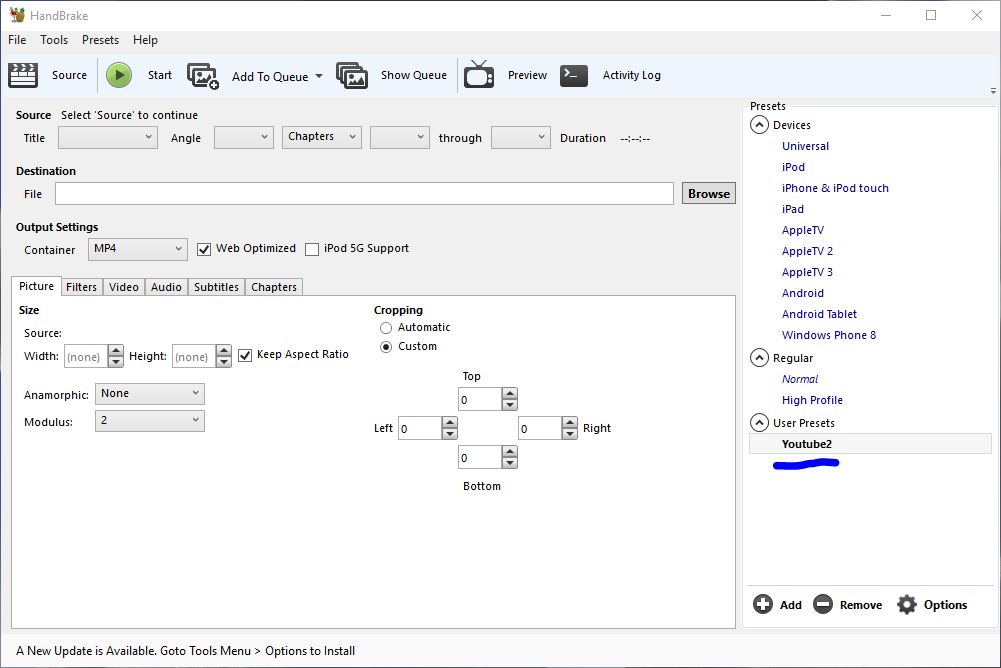
The only problem with the rendered output from After Effects is that the file is a freaking 19.4GB large!! Lucky the freeware gods has graced us with Handbrake, a video utility which I used to compress the file into a manageable 18.1MB. Here's how I did it:

  1. Previously, I've saved a settings profile specifically for Youtube uploads as in this picture below.

    Youtube settings profile
  2. Here are my settings for that
  3.  Be sure to click 'add audio tracks' or else your video won't have any

Final Product

Without further ado, let me present to you the final music video!


 PS. My gf loved it! Score one for song #1!!😄

Sheet music free DL here
https://www.4shared.com/office/7kmSWVy9ba/Missing_Piece.html

Wednesday, 1 March 2017

How to add hidden text to your audio

I've always liked cool stuffs like subliminal advertising or hidden stuffs in soundtracks like Undertale. So, one day I looked up on inserting specifically 'text' into audio and found several resources online (which I'll link below).

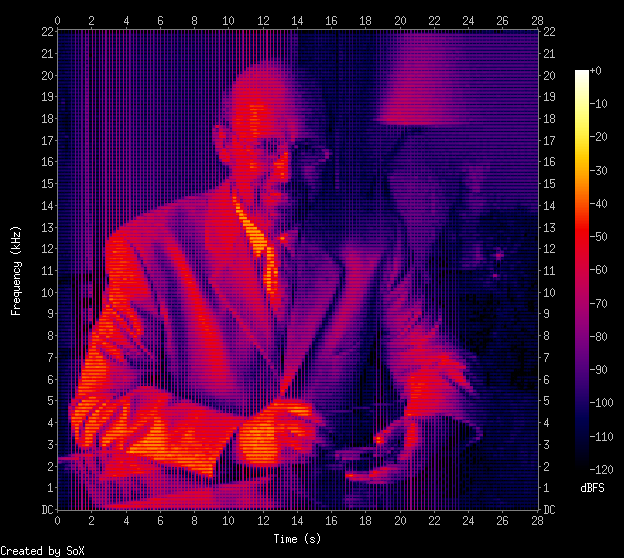
Spectrogram image courtesy Marco Barnig

Software needed

Basically I used Audacity for editing and viewing the spectrogram and Coagula for converting images to audio. Once you've installed Coagula, your launch screen should show a few windows and a blank canvas. Go to File>Open Image and select the image you have created. I've created mine using MS Paint and I tried to minimize the blank spaces around the text. Also, it's best if you use white text on black background.

Coagula interface
After that, when your picture loads up like mine, select Sound > Render without Blue. Coagula will play your odd sounding text once its done.

When you're done there'll be a new audio file entitled "Coagula.wav" will be in the same folder as the Coagula application. You can either use that file or you can save it out to a location of your choice by choosing File>Save Sound As as from the file menu.

Once I loaded the .wav file into Audacity, I reduced the volume of the sample by  Effect>Amplify and selecting negative decibels amplification. If your hidden message is louder than your original song, I think it'll be kinda hard to mask your intentions, right?

I dropped the volume to about -50dB and had to zoom in the near flat waveform. To view your message, click the dropdown arrow next to the 'msg' word to select Spectrogram. The file will look like this:

Spectrogram view
However the bottom half of the text still looks distorted. Here, click the dropdown arrow menu to select Spectrogram Settings, which will bring up this window:

Here change the Scale to Logarithimic and press Apply/OK.

Voila! Your hidden message  in both Left and Right Audio

More resources!
Marco Barnig's writeup on the spectrogram thing> http://www.web3.lu/spectrogram-speech-processing/
Lifehacker's own guide to embedding messages > https://lifehacker.com/5807289/how-to-hide-secret-messages-and-codes-in-audio-files

Song#1 Missing Piece - Mastering Stage

Ding-dong ding-dong! It's part 4 of 5 today, le Mastering Stage! -ragequits-
  1. Idea Stage
  2. Composing and Arranging Stage
  3. Recording Stage
  4. Mastering Stage
  5. Final Product
As always, please visit this project's intro blog. 

Mastering

After obtaining the MIDI data from my Clavinova in the previous post, I transfered it to my DAW (digital audio workstation) of choice, Ableton Live. Honestly, I've been learning and using Ableton for the past few months in earnest, though I had the program a year back.

A funny story here was that me and my neighbour Chu-Gen were supposed to learn the software together over his summer break. I provided him with the MIDI devices, like my Korg MicroKey and my Novation Launchpad Pro, in exchange for him teaching me how to use the program. It goes without saying that, that deal fell through with both of our busy schedules.

I started referencing online tutorials, blogs and the software manual itself (which is pretty darn good at explaining everything with cringe-worthy jokes inside) before I tried it out on a wedding dedication song before this blog started.

Back to the song at hand, I rigged up the MIDI direct into the arrangement page as you can see below

Arrangement View
 Here's my settings for the instrument chain:
Devices settings
As you can see here, I tweaked the macro reverb level to get that pearly pearly Steinway sound (though I don't think its anywhere comparable to the real thing). To get deep into the settings, I expanded the reverb chain and tweaked the decay time, reflect and diffuse to get the sound I wanted.

Then I threw in a stock preset EQ8 for piano by Ableton called Piano EQ2 which boosts the lows and highs. Since I did the reverb settings on the Instrument itself, I turned off the Master Reverb settings but I put a Limiter under the Master as shown below:

Limiter in the Master


A Limiter helps prevent the listener from having sudden loud audio blast their ears to the moon, but also helps set the target listening level - which I set to 3.50dB (since the source MIDI is rather soft).

The song in Audacity
In the above picture, I've imported the song into a freeware audio editing program called Audacity. Here's a secret, somewhere in that audio waveform I've added an extra something. Can you spot it?

Spectrogram form
I've given you some help here. This hidden extra can only be seen in Spectrogram form. Still cannot see it? All right, I'll zoom in the end of the song for you guys n girls!

Hidden message!
There you go! My proposal at the end of every song from now on! The only problem with adding these kind of stuffs to the song is that you can actually hear it if you listen carefully. 

If you're interested in adding hidden stuffs in your audio, I've written a post on it here.

Stay tuned for the final Part V of  V for this song!

More info!

Paul Cantrell has a great resource on mastering the real piano recording itself, you can check his blog here> https://innig.net/music/recordings/method/mastering.html